
PrestaShop
This document provides a detailed guide for the installation and configuration of the SeQura Affiliate Marketing plugin on your e-commerce platform. Follow these steps carefully to ensure a successful integration.
1. Registering the Ecommerce in the Affiliate System
The SeQura team will take care of registering your ecommerce in our affiliate system. Once this step is completed, you will receive a confirmation email with the next steps.
2. Plugin Reception and Installation
2.1. Access to the Plugin and Configuration Data
You will receive a secure link with access to the plugin necessary for its installation on your e-commerce platform. This link will also contain the specific configuration data for your integration.
2.2. Installation of the Plugin on your Ecommerce
- Download the plugin provided via the secure link.
- Access the administration panel of your e-commerce platform (Prestashop).
- Go to the plugins or extensions section.
- Upload the downloaded plugin file and start the installation process.
- Once installed, activate the plugin.
3. Configuration
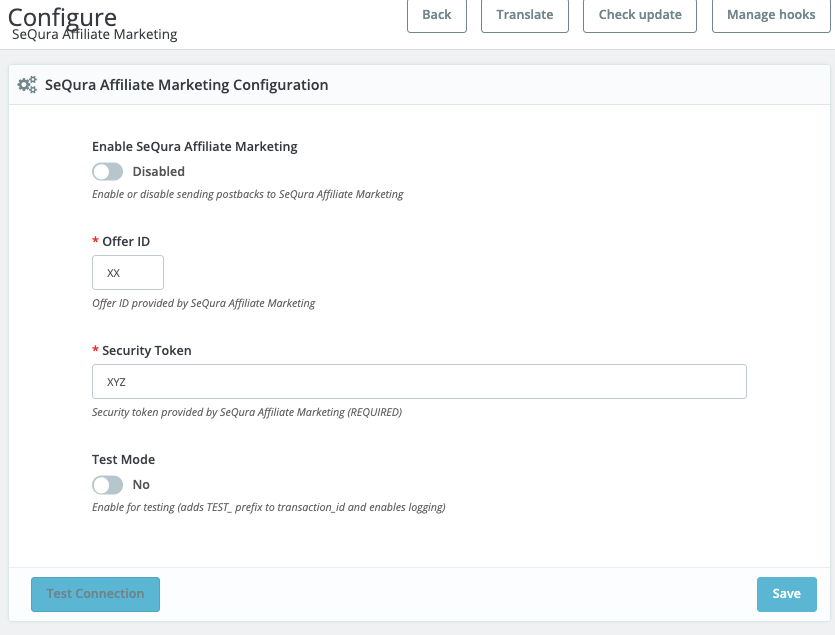
Once the plugin is installed, configure the following fields:
| Field | Description |
|---|---|
| Enable SeQura Affiliate Marketing | Enable or disable sending postbacks to SeQura Affiliate Marketing. |
| Offer ID | Enter the Offer ID provided by SeQura Affiliate Marketing (Required). |
| Security Token | Enter the Security token provided by SeQura Affiliate Marketing (Required). |
| Test Mode | Select No for production. Enable for testing (adds TEST_ prefix to transaction id and enables logging). |
Click Save to apply the changes.
4. Confirmation and Testing
4.1. Installation and Configuration Notification
Once you have completed the plugin installation and configuration, notify your contact at SeQura by email.
4.2. Test Purchase
Upon your confirmation, we will make a test purchase on your ecommerce to verify that everything works correctly and that the integration is active.
4.3. Finalization of the Integration
Once the tests are satisfactory, your ecommerce will be definitively registered in our affiliate program.
Support: For any questions or assistance during the process, do not hesitate to contact our technical support team.
Updated 8 months ago